HANGER Wardrobe HUD - RLV Outfit Organizer with Pictures
HANGER Wardrobe HUD - RLV Outfit Organizer with Pictures, One-Tap WEAR, Looks & Undo - UNLIMITED
L$ 699
“This is a versatile wardrobe management system for Second Life, offering a sleek interface to organize and wear outfits with ease.”
- Colour HUD with many colours included
- Try the demo first - we have no refunds
- Questions? Ask LECASTLE Assistant
Description
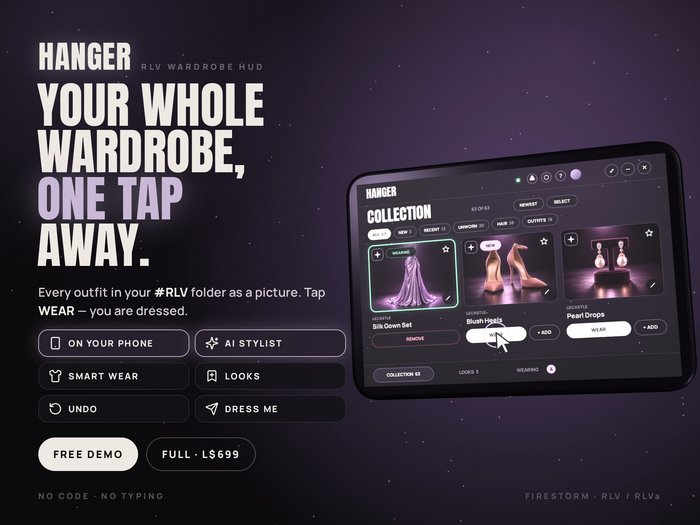
HANGER - YOUR WHOLE WARDROBE, ONE TAP AWAYTired of digging through hundreds of folders to find one dress? HANGER turns your outfits into a real wardrobe on your screen: every outfit as a picture, worn with a single tap. Most pictures even find themselves on the Marketplace.NEW: DRESS FROM YOUR PHONE. Scan a QR code on the HUD and your whole wardrobe opens on your phone - wear, change and plan looks from the sofa. No app, no password.This is the full HANGER: unlimited products and looks, paid once. Not sure yet? Try HANGER DEMO first (free, 5 products, 2 looks) - your wardrobe carries over.> QUICK SETUP - 3 minutes, every click shown:
https://wear.slecastle.com/setupNOTE: Needs a viewer with RLV or RLVa, such as Firestorm. The official SL viewer, the mobile app and browser viewers cannot dress you.------------
WHAT YOU CAN DO
------------
- WEAR - swap your outfit in one tap. Smart WEAR: a new outfit replaces the old one; new shoes only your shoes.
- + ADD - put a piece on top: shoes, hair, jewellery.
- ON YOUR PHONE - tap PHONE on the HUD, scan the code; or type it at wear.slecastle.com/web on a computer. Works only while your HUD is attached.
- LOOKS - save a whole outfit with its photo, wear it again in one tap.
- AI STYLIST - tap the sparkle on a product: it picks what goes with it from YOUR wardrobe. CREATE A LOOK builds a whole outfit for a night out, a date, the beach. 2 free AI credits a day.
- AUTO-TAG - the AI sorts a big wardrobe into categories and #tags.
- Pictures, found for you - covers come from the Marketplace by themselves, or paste a Gyazo link, a UUID or upload a photo.
- Notes, categories, #tags, folders, saved filters, search and sort.
- WEARING - every piece you have on by its real name; take off one piece, or all shoes, all jewellery at once.
- UNDO - put back what you had on.
- LET SOMEONE DRESS YOU - a friend with a link, or anyone near you who touches your Dress Me. You choose who.
- SHARE YOUR WARDROBE - a page with your pictures and Marketplace links.
- LOCK OUTFIT, layers (leftover alphas), product HUDs, BACKUP.
- Mini screen, sizes, day & night mode, themes, 4 languages. Free updates and a help film for every feature.------------
HOW IT WORKS
------------
HANGER reads only its own folder, #RLV/HANGER, and never moves, copies or changes your items.
1. Turn on media and RLVa in your viewer (Firestorm: Preferences > Firestorm > Extras), then restart.
2. Right-click the HUD > Add. It connects by itself.
3. Make a folder named HANGER inside #RLV and copy your outfits in, one folder per outfit. Keep only what you wear (your body's version, your hair size), and a colour HUD in a sub-folder named HUD.
4. Tap WEAR.------------
PRICE
------------
- HANGER - L$699, paid once: unlimited products and looks, free updates, 2 free AI credits a day. No subscription.
- More AI credits: optional packs at the HANGER terminal (from L$49).
- HANGER DEMO - free, 5 products and 2 looks:
https://marketplace.secondlife.com/p/HANGER-DEMO-Wardrobe-HUD-RLV-Outfit-Organizer-with-Pictures-One-Tap-WEAR-FREE-TRY/28733146
Using the demo? Wear HANGER instead: it takes over, your products, looks and pictures stay.------------
REQUIREMENTS
------------
- An RLV/RLVa viewer: Firestorm (tested); Alchemy, Catznip, Cool VL Viewer and Kokua should work.
- Media turned on (the HUD screen is a web page).
- Your outfits in #RLV/HANGER - the items or copies, not links.
- Phone: you stay logged in with your RLV viewer; the phone is your remote.------------
PRIVACY
------------
No sign-up, no password. HANGER keeps your avatar name, #RLV folder names, what you wear, your settings and pictures - never your items, chat, IMs or L$. https://wear.slecastle.com/privacyHelp & films: https://wear.slecastle.com/help
Store (free demo terminal): http://maps.secondlife.com/secondlife/Lorena%20Pink/132/10/22
Questions? Tap the speech bubble on the HUD - we reply on the HUD.
https://wear.slecastle.com/setupNOTE: Needs a viewer with RLV or RLVa, such as Firestorm. The official SL viewer, the mobile app and browser viewers cannot dress you.------------
WHAT YOU CAN DO
------------
- WEAR - swap your outfit in one tap. Smart WEAR: a new outfit replaces the old one; new shoes only your shoes.
- + ADD - put a piece on top: shoes, hair, jewellery.
- ON YOUR PHONE - tap PHONE on the HUD, scan the code; or type it at wear.slecastle.com/web on a computer. Works only while your HUD is attached.
- LOOKS - save a whole outfit with its photo, wear it again in one tap.
- AI STYLIST - tap the sparkle on a product: it picks what goes with it from YOUR wardrobe. CREATE A LOOK builds a whole outfit for a night out, a date, the beach. 2 free AI credits a day.
- AUTO-TAG - the AI sorts a big wardrobe into categories and #tags.
- Pictures, found for you - covers come from the Marketplace by themselves, or paste a Gyazo link, a UUID or upload a photo.
- Notes, categories, #tags, folders, saved filters, search and sort.
- WEARING - every piece you have on by its real name; take off one piece, or all shoes, all jewellery at once.
- UNDO - put back what you had on.
- LET SOMEONE DRESS YOU - a friend with a link, or anyone near you who touches your Dress Me. You choose who.
- SHARE YOUR WARDROBE - a page with your pictures and Marketplace links.
- LOCK OUTFIT, layers (leftover alphas), product HUDs, BACKUP.
- Mini screen, sizes, day & night mode, themes, 4 languages. Free updates and a help film for every feature.------------
HOW IT WORKS
------------
HANGER reads only its own folder, #RLV/HANGER, and never moves, copies or changes your items.
1. Turn on media and RLVa in your viewer (Firestorm: Preferences > Firestorm > Extras), then restart.
2. Right-click the HUD > Add. It connects by itself.
3. Make a folder named HANGER inside #RLV and copy your outfits in, one folder per outfit. Keep only what you wear (your body's version, your hair size), and a colour HUD in a sub-folder named HUD.
4. Tap WEAR.------------
PRICE
------------
- HANGER - L$699, paid once: unlimited products and looks, free updates, 2 free AI credits a day. No subscription.
- More AI credits: optional packs at the HANGER terminal (from L$49).
- HANGER DEMO - free, 5 products and 2 looks:
https://marketplace.secondlife.com/p/HANGER-DEMO-Wardrobe-HUD-RLV-Outfit-Organizer-with-Pictures-One-Tap-WEAR-FREE-TRY/28733146
Using the demo? Wear HANGER instead: it takes over, your products, looks and pictures stay.------------
REQUIREMENTS
------------
- An RLV/RLVa viewer: Firestorm (tested); Alchemy, Catznip, Cool VL Viewer and Kokua should work.
- Media turned on (the HUD screen is a web page).
- Your outfits in #RLV/HANGER - the items or copies, not links.
- Phone: you stay logged in with your RLV viewer; the phone is your remote.------------
PRIVACY
------------
No sign-up, no password. HANGER keeps your avatar name, #RLV folder names, what you wear, your settings and pictures - never your items, chat, IMs or L$. https://wear.slecastle.com/privacyHelp & films: https://wear.slecastle.com/help
Store (free demo terminal): http://maps.secondlife.com/secondlife/Lorena%20Pink/132/10/22
Questions? Tap the speech bubble on the HUD - we reply on the HUD.
You may also like
 Yussuz Dress Set FatpackLegacy · Maitreya · LaraX · RebornL$ 99
 Beni Outfit FatpackLegacy · Perky · Maitreya · LaraXL$ 224
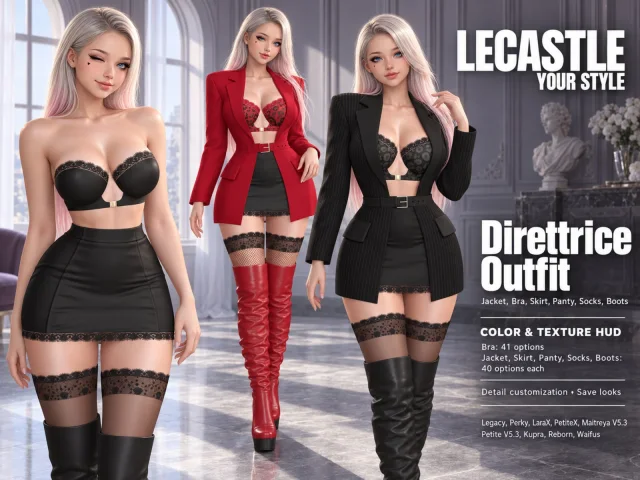 Direttrice Outfit FatpackLegacy · Perky · Maitreya · LaraXL$ 224
 Frankie Outfit FatpackLegacy · Perky · LaraX · PetiteXL$ 99
 Taking Dead Dual FigureL$ 224
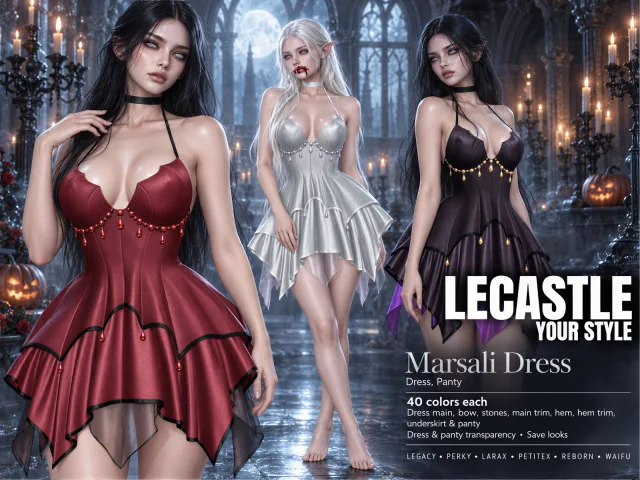 Marsali Dress FatpackLegacy · Perky · LaraX · PetiteXL$ 224
 Hayriye Outfit FatpackLegacy · Perky · LaraX · PetiteXL$ 224
 PeMan FigureL$ 224